Meta ad sizes and specs
Every Facebook and Instagram ad dimension, aspect ratio, file limit and character count in one reference — plus which placements share a single creative and which need their own.
Updated 31 August 202611 min read
Meta's feed spec is 4:5, and the square cheat sheets are five years stale
If you are still exporting Facebook feed ads at 1080 x 1080, you are shipping the 2019 answer. Meta's own Ads Guide lists the Facebook Feed image ad as 4:5, 1440 x 1800 pixels, and lists Facebook Feed video the same way. Square still renders — nothing breaks, no rejection — but it occupies less of a phone screen than the vertical, and it is not what Meta recommends.
Check it yourself in about thirty seconds. The Ads Guide re-renders per placement and per objective at facebook.com/business/ads-guide; the pages under /update/ are the awareness-objective sheets, and those are the numbers below. Every figure on this page came off those placement pages during the week of writing. Where Meta publishes no value, the cell is empty rather than filled in from somebody's blog post.
One thing to absorb before the tables. Meta does not recommend 4:5 for Instagram Feed video. The Instagram Feed video page specifies 9:16 at 1080 x 1920, minimum width 250; the Instagram Feed image page on the same site specifies 4:5 at 1440 x 1800. That is not a transcription error — it reflects how much of Instagram's in-feed video inventory now behaves like Reels. If you are cutting one vertical video for Instagram, cut it 9:16.
Feed and Explore placements
Image
| Placement | Ratio | Recommended | Minimum | Tolerance | File |
|---|---|---|---|---|---|
| Facebook Feed | 4:5 | 1440 x 1800 | 600 x 750 | 3% | JPG/PNG, 30MB |
| Instagram Feed | 4:5 | 1440 x 1800 | 500 px wide | 1% | JPG/PNG, 30MB |
| Instagram Explore home | 4:5 | 1440 x 1800 | 500 px wide | 1% | JPG/PNG, 30MB |
| Facebook Marketplace | 1:1 | 1080 x 1080 | — | — | JPG/PNG, 30MB |
Instagram publishes a permitted range as well as a target: minimum aspect ratio listed as 400 x 500, maximum as 191 x 100. Anything taller than 4:5 in the feed is cropped to 4:5, which is why a 9:16 image dropped into a feed-only ad set loses its top and bottom.
The tolerances are the part nobody prints and everybody trips over. Facebook Feed permits 3% deviation from the stated ratio; Instagram Feed permits 1%. At 1080 pixels wide, Instagram's band runs from roughly 1337 to 1364 pixels tall, while Facebook's runs from about 1311 to 1392. So a 1080 x 1330 crop — the kind you get from eyeballing a frame rather than typing numbers — clears Facebook and fails Instagram. The asset serves happily on one platform and quietly does not on the other, and nothing in the interface tells you which.
Video
| Placement | Ratio | Recommended | Minimum | Duration | File |
|---|---|---|---|---|---|
| Facebook Feed | 4:5 | 1440 x 1800 | 120 x 120 | 1s – 241 min | MP4/MOV/GIF, 4GB |
| Instagram Feed | 9:16 | 1080 x 1920 | 250 px wide | 1s – 60 min | MP4/MOV/GIF, 4GB |
The 241-minute ceiling on Facebook Feed video is real and entirely useless. Practical feed video is six to fifteen seconds. Google's ABCD playbook, its published creative-effectiveness guidance, recommends introducing the brand or product within the first five seconds and aiming for two or more shots in that window; if your idea cannot land inside fifteen, length is not the problem you have.
Also worth knowing: Meta's own page notes that on the awareness objective, the ad footer on a Facebook Feed video ad — headline, description and call-to-action button — is not displayed on mobile. Whatever the button was going to say has to be in the frame.
Stories and Reels
All five are 9:16 at 1440 x 2560, except Facebook Reels, which shares the ratio and resolution. What differs is duration, minimum width, and what the placement will not let you do.
| Placement | Recommended | Minimum width | Duration | Notes |
|---|---|---|---|---|
| Instagram Stories image | 1440 x 2560 | 500 px | Shows 5–16s or until swipe | JPG/PNG, 30MB, 1% tolerance |
| Instagram Stories video | 1440 x 2560 | 250 px | 1s – 60 min | Over 16s splits across cards |
| Instagram Reels image | 1440 x 2560 | 500 px | — | JPG/PNG, 30MB, 1% tolerance |
| Instagram Reels video | 1440 x 2560 | 250 px under 30s; 500 px at 30s+ | 0s – 15 min | Licensed music, camera effects, GIFs and product tags not permitted |
| Facebook Stories video | 1440 x 2560 | 250 px | 1s – 3 min | Over 15s splits across cards |
| Facebook Reels video | 1440 x 2560 | — | No maximum published | Auto-captioning not supported |
The Reels minimum-width rule is the one that bites. Two hundred and fifty pixels wide is acceptable under thirty seconds; a Reel of thirty seconds or longer needs at least 500. Nobody exports at 250 on purpose, but transcoded assets pulled out of a client's media library arrive that way often enough to be worth checking before you blame the ad set.
Safe zones, in pixels
For Instagram Stories, Instagram Reels and Facebook Reels, Meta's placement pages give the same three numbers: keep roughly 14% of the top, 35% of the bottom and 6% of each side clear of text, logos and anything else that has to be read.
Facebook Stories is the exception, and it is the discrepancy worth writing on the studio wall. Its page states approximately 14% (250 pixels) of the top and 20% (340 pixels) of the bottom. Fifteen percentage points of bottom margin is a whole line of type. Note also that those pixel figures do not reconcile with those percentages at either 1080 x 1920 or 1440 x 2560 — 250 pixels is 13% of a 1920-tall frame and under 10% of a 2560-tall one. Design to the percentages, and where the same asset is going to Reels as well, design to the stricter Reels numbers and stop thinking about it.
Work it through on a real frame. At 1080 x 1920, the Reels reservation costs 269 pixels at the top, 672 at the bottom and 65 on each side, leaving a usable band of roughly 950 x 979 pixels — a square, sitting slightly above centre in a vertical frame. That is the whole canvas for a headline and a call to action.
What sits in those bands is not arbitrary. The top holds the profile row and account name, plus the progress segments on Stories. The bottom is the expensive one: call-to-action button, "Sponsored" label, caption, and on Reels the audio ticker. The 6% side margin exists almost entirely for the right-hand action rail, which floats over your creative rather than beside it.
The rule I hold to: on 9:16, nothing that must be read goes below the vertical midpoint. A layout that needs the lower third is a 4:5 layout in costume.
Character counts, which truncate before your pixels do
Dimensions are the easy half. Copy limits vary by placement and objective — the guide serves a different sheet for awareness than for traffic — so these are the awareness figures.
| Placement | Primary text | Headline |
|---|---|---|
| Facebook Feed image and video | 50–150 (recommended range) | 27 |
| Instagram Feed image | 125 | 40 |
| Instagram Explore home image | 125 | 40 |
| Facebook Marketplace image | 125 | 40 |
| Instagram Feed video | 125 | — |
| Instagram Stories image and video | 125 | — |
| Facebook Stories video | 125 | 40 |
| Instagram Reels image and video | 44 | — |
| Facebook Reels video | 40 | 55 |
Read the last two rows twice. Instagram Reels lists 44 characters of primary text; Facebook Reels lists 40. That is about six words. A writer who drafts one 125-character line for the whole campaign will watch it get cut on precisely the placements where the video budget is going.
Facebook Feed's 50–150 is published as a recommendation, not a hard cap. The field takes more and the feed folds the surplus behind "See more" — which, in practice, eats the clause you needed read. Treat 150 as the limit even though nothing stops you.
Instagram permits up to thirty hashtags. Thirty hashtags on a paid post reads like a 2016 organic account and competes with the 125 characters you actually have. Marketplace, unusually, also publishes a 30-character description field; most feed placements no longer tabulate one at all, which is why the column is absent above.
File formats, and the settings that get files rejected
Images: JPG or PNG, 30MB, across every placement here. Nothing sensible comes near 30MB, so the ceiling rarely matters. The minimum widths do.
Video: MP4, MOV or GIF, 4GB. Meta specifies H.264 compression, square pixels, fixed frame rate, progressive scan and stereo AAC audio at 128kbps or above, with no edit lists or special boxes in the file container. Two of those catch people. Variable frame rate is what a phone records by default and what several screen-capture tools emit; it violates "fixed frame rate" and is a genuine cause of files that upload but transcode badly. And "edit lists" means a clip trimmed in a player rather than re-encoded in an editor can carry container metadata Meta will not accept.
Which shapes actually need their own creative
Two, mostly: 4:5 and 9:16. That covers Facebook Feed, Instagram Feed, Instagram Explore home, Stories on both platforms and Reels on both platforms. The honest exception is Facebook Marketplace, which asks for 1:1 at 1080 x 1080 — so if Marketplace is in the buy, the square is not optional, and the common advice that 1:1 is dead within Meta is wrong.
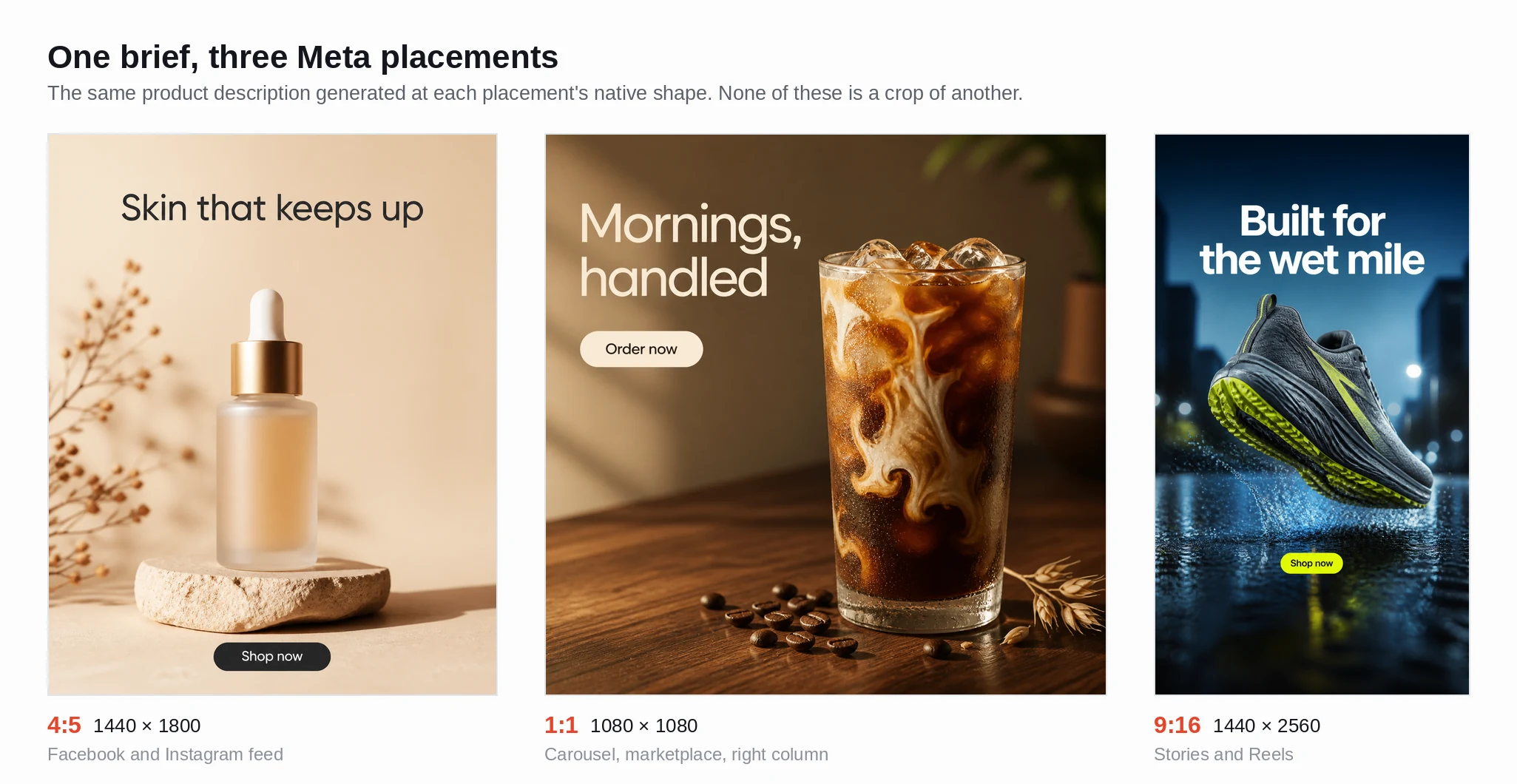 One product, one headline, one call to action, laid out three ways: 4:5 for the feeds, 1:1 for Marketplace and for platforms outside Meta that demand a square, and 9:16 with the copy pulled into the centre band clear of the reserved top and bottom.
The square earns its keep elsewhere too — LinkedIn recommends 1:1 for delivery across desktop and mobile, and Google Demand Gen asks for a 1:1 image asset outright. What 16:9 is not, is a Meta shape; that one is for YouTube.
Which leaves the tedious part. Meta wants at least three aspect ratios of the same idea, each with the copy re-laid-out against different margins and a different character ceiling, and hand-exporting each one in a design tool is where an afternoon disappears. Describing the product once and having an ad generator compose the 4:5, the 1:1 and the 9:16 as finished frames — headline and call to action already set into each — removes the step that produces the wrong-size export in the first place.
Producing the set
You have the numbers; what is missing is the artefact. A workable Meta set is one 4:5 image at 1088 x 1360 or larger for both feeds, one 9:16 image at 1088 x 1936 for Stories, and one 9:16 video of six to ten seconds for Reels and Stories. Those clear every minimum in the tables — 600 x 750 for Facebook Feed, 500 pixels wide for Instagram Feed and Stories images, 250 for Reels video under thirty seconds.
Two caveats, stated plainly. The 4:5 at 1088 x 1360 is 0.8000 exactly, inside even Instagram's 1%. The 9:16 at 1088 x 1936 is 0.5620 against a true 0.5625 — off by under a tenth of a percent, comfortably inside the 1% band, but not the "exact" figure a spec sheet implies. And Meta recommends 1440 x 1800 and 1440 x 2560, so a 1088-wide master sits above the minimum and below the recommendation. On photography and large type that gap is invisible on a phone. On fine linework or small legal text it is not, and you should master at the recommended size.
For the vertical video, the copy has to live inside that roughly 950 x 979 centre band, the product has to arrive inside five seconds if you follow Google's ABCD guidance, and the frame has to work with the sound off. When you want that set produced rather than assembled by hand, an ad generator that outputs 4:5, 1:1, 9:16 and 16:9 from a single brief — composing each for its own placement, and putting a safe-zone overlay on the 9:16 result so you can check the margins before you upload — gets you there with the reserves accounted for.