TikTok ad specs
TikTok ad formats, video dimensions, duration limits and the safe zones that decide whether your text survives the interface overlay.
Updated 31 August 20269 min read
Two rule sets, and knowing which one you are in
Everything on this page reduces to one question: are you uploading a video file, or authorising a post that already exists? Standard auction In-Feed ads take an upload, and that upload is checked against a published list of minimums. Spark Ads take an organic post — yours, or a creator's, released to you with a code — and serve it in place, which means there is almost nothing left to check.
Auction In-Feed is the placement most advertisers will ever touch: the ad that appears between organic videos in the For You feed. TopView, Pulse, Branded Mission and Branded Effects are reservation buys negotiated through a sales contact, and if you have that contact you also have their spec deck. This page covers the two auction paths, because those are the two you can build for on a Tuesday afternoon without asking anyone's permission.
In-feed video: the published specification
These are the values in TikTok's Auction In-Feed Ads help article. The resolutions are floors, not suggestions — below them the upload fails.
| Property | Value |
|---|---|
| Aspect ratio | 9:16 recommended; 1:1 and 16:9 also accepted |
| Minimum resolution, 9:16 | 540 x 960 |
| Minimum resolution, 1:1 | 640 x 640 |
| Minimum resolution, 16:9 | 960 x 540 |
| Practical export | 1080 x 1920 |
| File types (non-Spark) | .mp4, .mov, .mpeg, .3gp, .avi |
| Maximum file size | 500 MB |
| Minimum bitrate | 516 kbps |
| Maximum duration | 10 minutes |
| Account name | One line, 20 characters (10 for Chinese, Japanese, Korean) |
| Ad caption (non-Spark) | White, uniform font, not customisable; no clickable links, no @ symbols, no hashtags |
| Profile image (optional) | 98 x 98, 1:1, .jpg/.jpeg/.png, under 50 KB, key detail inside a central 66 x 66 |
Two rows there deserve arguing with.
The 516 kbps floor is so low as to be meaningless. A 1080 x 1920 clip encoded near that number looks like something recovered from a 2011 hard drive. Export H.264 somewhere in the 6 to 10 Mbps range and stop thinking about it, because 500 MB is an enormous ceiling for a vertical clip measured in seconds — you will not come close.
The other is the acceptance of 1:1 and 16:9. They are accepted in the sense that the file validates and the campaign runs. In the For You feed a 16:9 asset occupies roughly a third of the screen height and sits in a black field that reads instantly as repurposed television; a 1:1 leaves two thick bars that interface elements then float over. Those ratios exist largely so your creative can serve in Pangle and other off-app inventory without failing an asset check. Support is not endorsement. Build 9:16.
One more thing the article does not give you: a character count for the non-Spark ad caption. It specifies the styling and the prohibitions and stops there. Plenty of spec sheets confidently publish a number anyway. Write the caption short, front-load the proposition, and check it in the preview rather than trusting a figure nobody can source.
Safe zones, measured in pixels
Percentages are how safe zones get discussed; pixels are how they get used. Here is the arithmetic on a 1080 x 1920 frame.
Be clear about where these come from. TikTok does not publish a canonical safe-zone table in its Ads Manager help the way Meta publishes its Reels figures. The set below is the one that circulates in overlay templates and agency decks, and it matches where the interface actually sits when you measure a screenshot. Treat it as a good working measurement, not as a quoted specification.
| Edge | Reserve on 1080 x 1920 | What sits there |
|---|---|---|
| Top | 130 px | Following / For You tabs, status bar |
| Bottom | 483 px | Handle, caption, music ticker, CTA button, Sponsored label |
| Right | 140 px | Profile, like, comment, share, sound disc |
| Left | 44 px | Rounded-corner and gesture margin |
That leaves a usable rectangle of 896 x 1307 px, starting at x = 44 and y = 130 — a little over 56 per cent of the frame. Nothing outside it is cropped. It is all still there. It is simply competing with an interface element for the viewer's attention, and it loses.
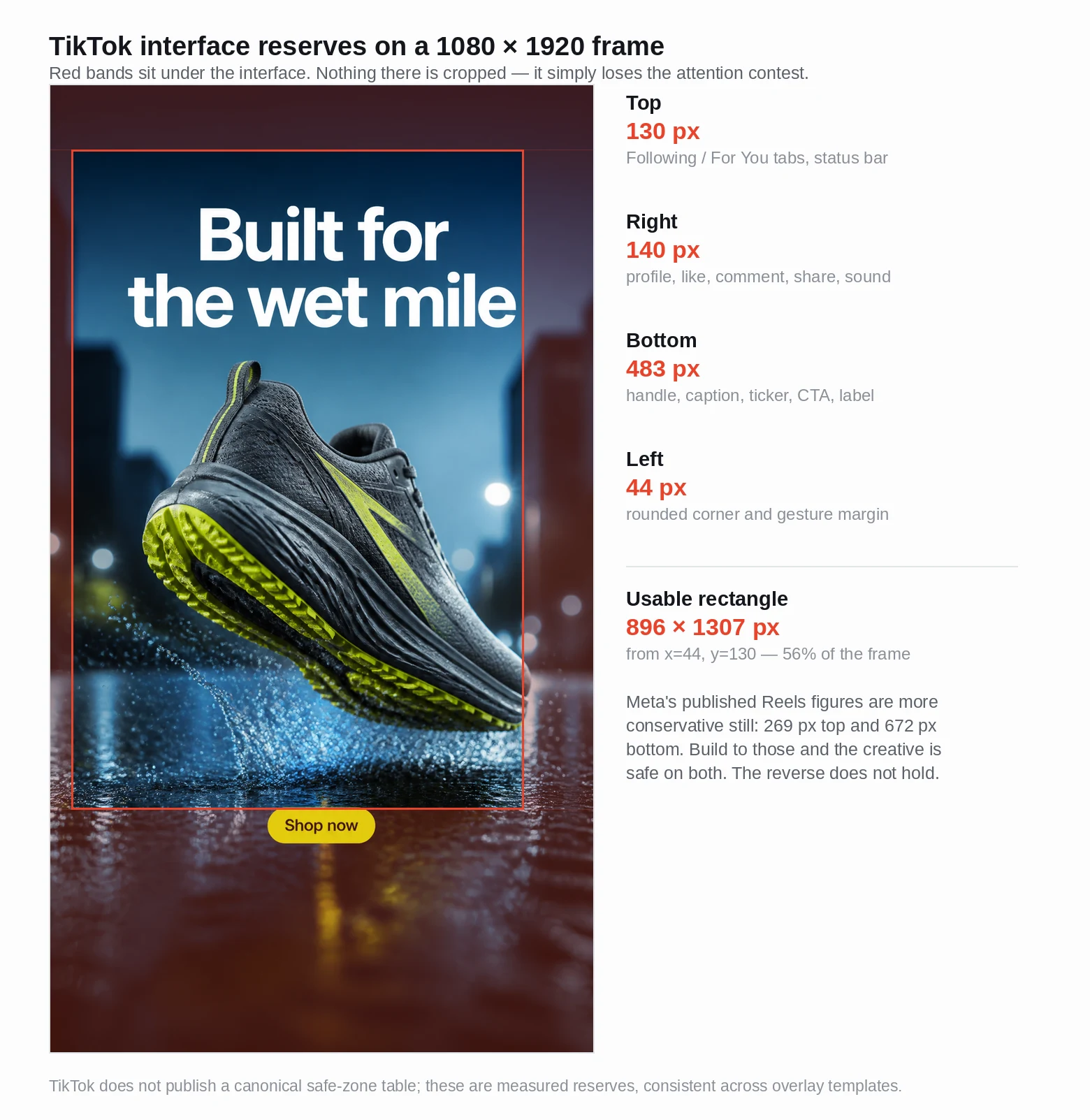 The measured reserves on a real 9:16 creative: headline and call to action both sit inside the 896 x 1307 band, well clear of the right-hand action rail.
Losing close to 44 per cent of a vertical frame changes what a layout can be, and it is why a creative that looked balanced in your editor looks broken in the feed. Our ad generator is handed those bands as a composition constraint before it builds a 9:16 frame, and every result carries a safe-zone overlay you can switch on to check the headline and button against them — the reserve is accounted for when the frame is composed rather than discovered after the export.
The reserves are not fixed, either. A long caption pushes the bottom stack up, a long sound title widens the ticker, and a CTA button with a wordy label sits higher than a short one. On a busy post the bottom encroachment can approach 700 px, which cuts the working height to roughly 1090 px. If your headline has to survive every case, build to the stricter figure and treat the remaining 200 px as insurance.
Worth knowing as a cross-check: Meta specifies roughly 14 per cent clear at the top and 35 per cent at the bottom for 9:16. On a 1920-pixel frame that is 269 px and 672 px, both more conservative than the TikTok numbers. A creative built correctly for Instagram Reels is already safe on TikTok. The reverse does not hold.
Spark Ads have no specification, and that is not a typo
TikTok's help documentation states, for Spark Ads, that "there are no restrictions on video ratio, video resolution, file type, video duration, bitrate, and file size." Not relaxed limits. None.
The reason is structural. A Spark Ad does not upload an asset. You authorise an existing organic post and TikTok serves that post as the ad, keeping its view count, its comments, its likes and the handle it was published under. There is no separate ad file, so there is nothing to validate. The only hard constraint TikTok names is a 10-minute maximum on what can be sparked. The same article elsewhere lists .mp4 and .mov as the Spark file types, which reads as a leftover — the post has already cleared TikTok's ordinary upload path, which is the real gate.
The consequences run past the spec sheet. The caption comes from the organic post and cannot be edited during ad creation; a maximum of four lines display, emojis included. The display name is the posting account's, not a brand-name field you control. Engagement accrues to the original post, so pausing the campaign leaves the social proof standing rather than deleting it. And you must un-authorise a video as a Spark Ad before deleting it from the organic account, or the ad breaks.
The practical read: if a post already performed organically, sparking it beats re-uploading the same file as a standard In-Feed ad almost every time, because it inherits the comment thread and the creator's handle. For net-new creative that has never been posted, standard In-Feed is the simpler route and the table above applies.
Duration: the 10-minute ceiling is a distraction
Ten minutes is a technical maximum. Quoting it without comment is how spec pages mislead people, because nobody has ever deliberately run a ten-minute auction in-feed ad.
What works sits somewhere between nine and twenty seconds for direct response. TikTok's own creative guidance is more specific about the front of that window than the back: prioritise the hook in the first six seconds, and land the core proposition inside the first three. Google's ABCD playbook, written for its own platforms but built on the same attention problem, pushes harder — aim for two or more shots in the first five seconds, use tight framing on the subject whether that is a product or a person, and introduce the product or brand within those first five seconds. If people appear, open with them on screen and have them address the audience.
Six seconds is a defensible floor for a product ad carrying a headline and a call to action: roughly two seconds of hook, two of proposition, two of resolution. Below that you are making a bumper, which is a different craft with different rules. Above thirty you need a narrative reason, and "we shot more footage than that" is not one.
Captions and sound
Burn your captions in. TikTok's auto-captions are decent, but they render in the platform's own style near the bottom of the frame — inside the 483-pixel reserve you have just been told to avoid — and they fight your own text for the same space. TikTok's caption-pacing guidance is five to ten words per second, which doubles as a script check: a six-second ad supports roughly thirty to sixty spoken words, and a script longer than that is a radio ad with pictures attached.
Design for sound-off legibility, produce with sound on. Those are not in conflict. Google reports that 70 per cent of global watch time happens on mobile, which is the argument for type large enough to read at arm's length on a phone; below about 40 px on a 1080-wide frame you are gambling. But TikTok is a sound-on environment in a way the Facebook feed is not, and a silent asset there reads as an import from somewhere else. It does not need a voiceover. A track and two or three foley hits are enough to stop the ad feeling inert.
Porting a creative from another platform
The usual situation is that a Meta creative already exists and TikTok is the second placement. Fine as a starting point, poor as a finishing one. A 4:5 asset scaled into 9:16 leaves bars; cropping 4:5 down to 9:16 takes 36 per cent off the width, which is precisely where a centred product tends to sit.
Regenerate rather than reframe. Building the TikTok variant natively at 9:16, with copy composed inside the centre band, produces an asset that respects the interface reserves by design instead of surviving them by luck — an AI ad generator can build that variant from the same product photo and description in about a minute for video, or fifteen seconds for a still, which beats reopening the original project file and re-laying-out the type.
A note on export dimensions. A 1088 x 1936 file is a hair off exact 9:16 (1.7794 against 1.7778) and comfortably clear of the 540 x 960 minimum, so it uploads and serves without complaint; TikTok scales it to the display frame. To map the safe-zone figures above onto it exactly, multiply by 1.0083 — the 130 px top reserve becomes 131, the 483 px bottom becomes 487. That difference is smaller than the variation a two-line caption introduces. Work to the 1080 x 1920 numbers and keep the margin.